Wheel offset visualizer: poke, flush or tuck on your car
The same wheel can tuck, sit flush or poke past the fender depending on one number. Here's what offset changes, and how to preview it on a photo of your own car before you buy — free, in your browser.
What offset actually is
Offset — written ET, from the German Einpresstiefe — is the distance in millimetres between a wheel's mounting face and its true centreline. Positive offset moves the mounting face outward, which tucks the wheel inward toward the car; low or negative offset pushes the wheel outward toward the fender. That single number is what decides whether a set sits buried in the arch or fills it. For the full picture — how offset interacts with width, backspacing and clearance — see the wheel fitment guide; this page is about seeing what it does.
Why the same wheel looks completely different at +45, +35 and +20
Take one wheel design and bolt it on at three different offsets and you get three different cars. At a high offset like +45 the wheel tucks inside the arch — the factory, conservative look. Drop to +35 and the face moves outward toward the fender line for a flush stance. Go to +20 and the wheel sits proud of the bodywork — the aggressive poke look. Nothing about the wheel changed; only where it sits did. The move is almost linear: every millimetre you drop the offset pushes the wheel face roughly one millimetre further out.
| Offset | Face moves out vs +45 | Typical look |
|---|---|---|
+45 | 0 mm (baseline) | Tucked inside the arch |
+35 | ~10 mm further out | Approaching flush |
+30 | ~15 mm further out | Flush |
+20 | ~25 mm further out | Slight poke |
Because the change is that direct, small numbers matter: a 10 to 15 mm swing in offset is the difference between "looks stock" and "looks modified." That is exactly why a visualizer helps — the numbers on a spec sheet don't tell you how 15 mm reads on your body lines and ride height.
How to preview offset with WheelPeek
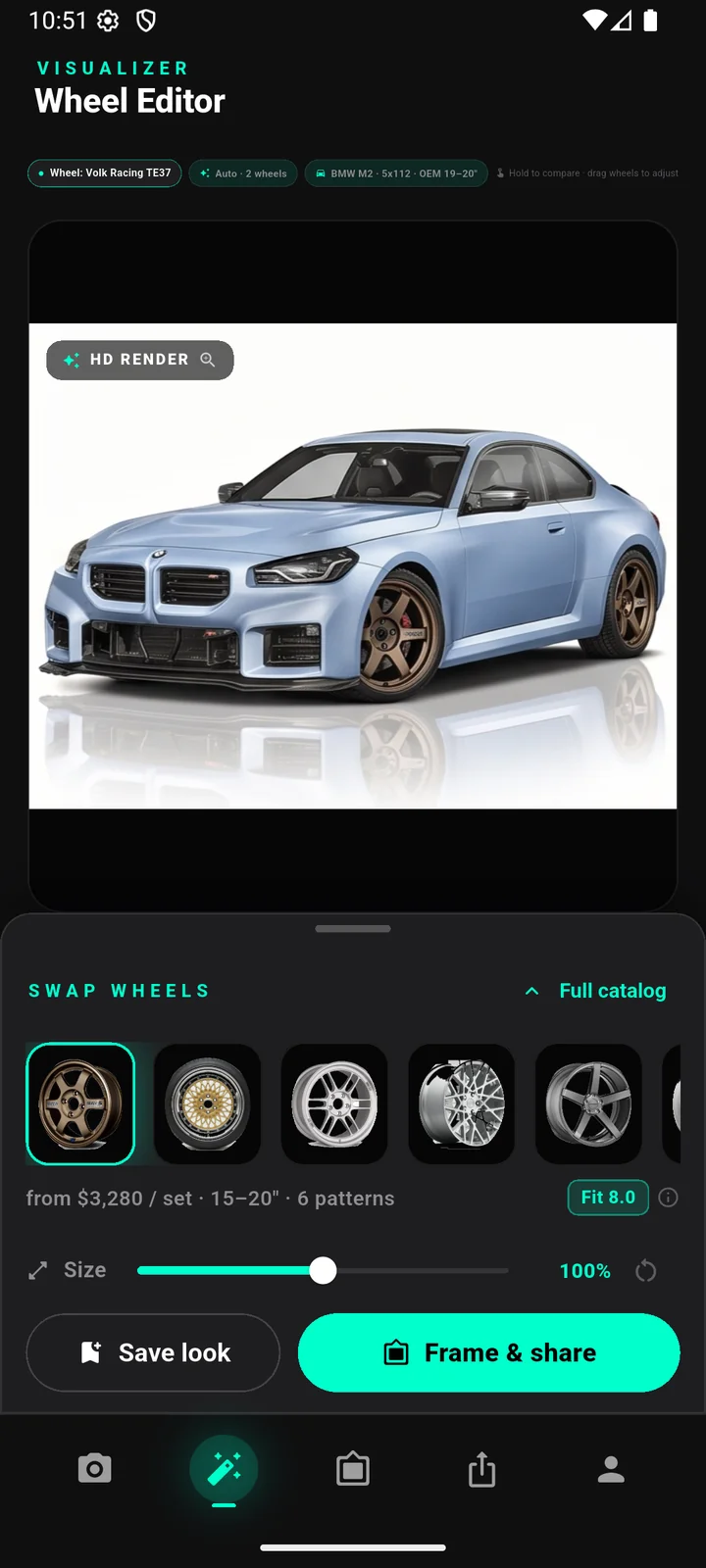
WheelPeek renders real wheels onto a photo of your own car in about ten seconds. It reads your car's make, model, bolt pattern and OEM sizes from the photo, and if your car is already modified — lowered, on wider wheels, running a non-stock offset — a custom fitment override lets you enter what you actually run so the app scores against your real setup rather than the factory numbers.
Be clear-eyed about what a render is and isn't. The AI image shows you the wheel's design, finish and how it sits on your specific car, which is the part that's genuinely hard to picture from a product photo. The precise clearance — whether a given offset rubs the fender at full lock or fouls a strut — comes from the numbers, not the picture. WheelPeek's job is to settle the look; the spec sheet and your installer settle the fit. Use them together: render to decide what you like, then confirm the offset actually clears before you order.
Pitfalls to watch with offset
Chasing a lower offset for looks has real consequences, and they're worth knowing before you commit:
- Rubbing. Push the wheel too far out and the tyre catches the fender lip over bumps or at full steering lock; push it too far in and it can foul the strut or suspension. Poke often needs a fender roll or a small pull.
- Scrub radius and steering feel. Offset changes the geometry the steering was designed around. A big drop alters scrub radius, which can make the wheel tug under braking, add torque steer and speed up bearing and tie-rod wear.
- Load and hardware. A wheel pushed outward puts more leverage on the hub and bearings; combined with a wheel that isn't load-rated for your car, that's a durability problem, not just a comfort one.
- Inspection and insurance. In some countries wheels that sit outside the bodywork fail a roadworthiness or technical inspection, and undeclared modifications can affect an insurance claim. Check the rules where you live before you go aggressive.
Honest note: renders show the look; offset, clearance and load rating decide the fit, and they are estimates until confirmed. Always verify bolt pattern, offset, width and brake clearance with the seller or manufacturer — and the local rules — before ordering.
FAQ
What does changing wheel offset do to the look?
It moves where the wheel sits in the arch. A higher (more positive) offset tucks the wheel inward for a stock look; a lower or negative offset pushes it outward toward the fender for a flush or poked stance. The change is roughly one-to-one — drop the offset by 10 mm and the wheel face moves out about 10 mm.
Can a visualizer show different offsets on my car?
WheelPeek renders real wheels on a photo of your car and shows their design, finish and stance on your actual bodywork — it does not re-render the car at a specific offset number you type in. If you already run a non-stock offset, a custom fitment override lets you enter it so the Decision Score matches your build. The render settles the look; the exact clearance for a given offset comes from the spec numbers, which you should confirm before ordering.
Is lower offset always better?
No. Lower offset gives a wider, more aggressive stance, but it can cause rubbing, change scrub radius and steering feel, add load to the bearings and, in some places, fail inspection. It's a trade-off to make deliberately, not a default — which is why seeing it first and checking the numbers both matter.
Is WheelPeek free?
Yes — during the public beta everything is free to try in your browser: just sign in with Google, no credit card, nothing to install. Renders take about ten seconds each.